
I once had a junior developer ask me why his rgb(255, 255, 255) CSS background was rendering as pure white instead of black. He assumed that mixing all the colors together would create a dark, muddy mess, exactly like mixing every color of paint in a kindergarten art class. I had to explain to him that monitors don't use paint. They use lasers. The RGB color model is the fundamental physics of how digital screens emit light into your eyeballs, and if you don't understand it, you can't debug CSS.
The RGB model stands for Red, Green, and Blue. It is the absolute foundational layer of every single color on the internet. Even if you use Hex codes or HSL in your stylesheet, the browser engine violently translates it back into raw RGB before it tells your monitor which pixels to illuminate.
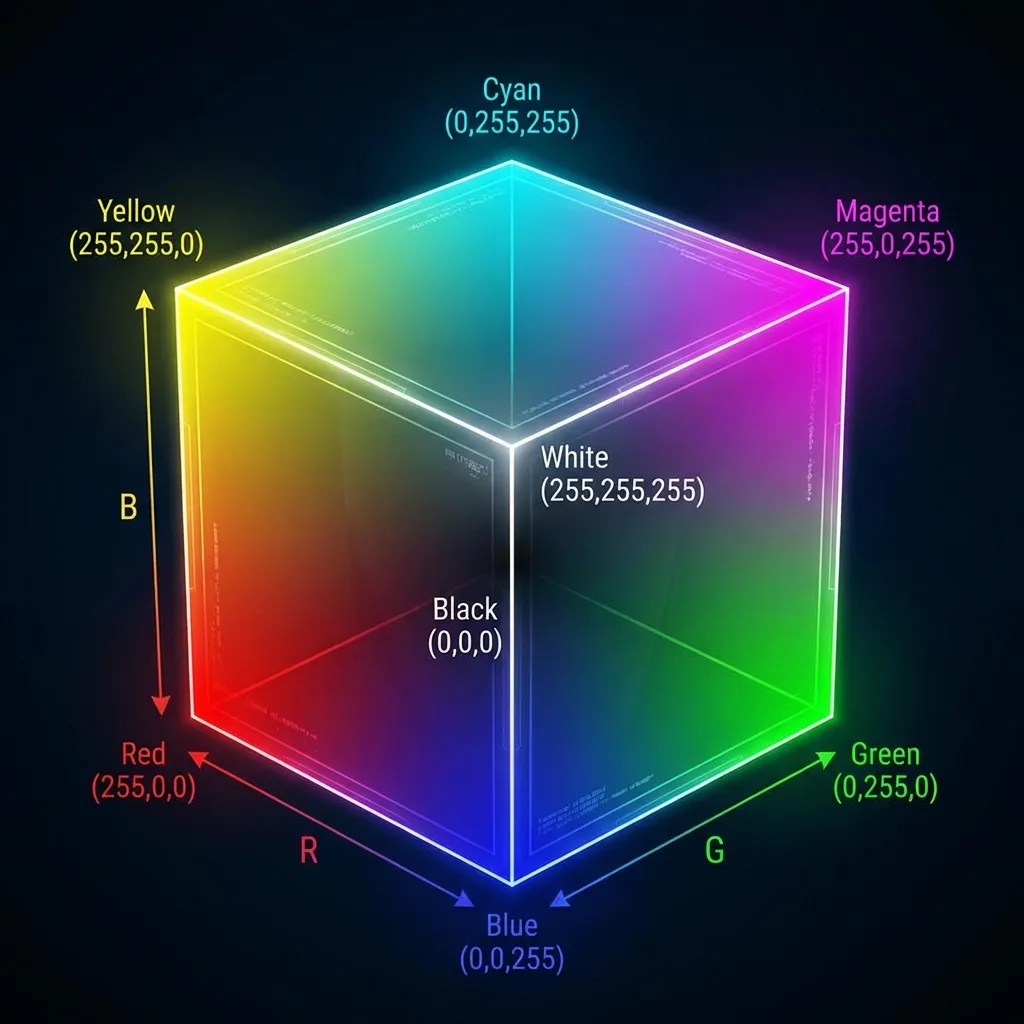
The physics of additive light
RGB is an additive color model. This means you start with absolutely nothing (pure, pitch black darkness). When you want a color, you add light. If you add 100% red light, 100% green light, and 100% blue light, the wavelengths combine visually to create pure white. This is exactly the opposite of physical paper printing (CMYK), which starts with white paper and subtracts light using ink.
In CSS, the standard RGB syntax uses Base-10 math, ranging from 0 (completely off) to 255 (maximum power). Writing rgb(255, 0, 0) explicitly tells the monitor: "Turn the red pixels to their absolute maximum brightness, and turn the green and blue pixels completely off."
The number 255 isn't arbitrary. It comes from 8-bit computing history. 8 bits of data can hold exactly 256 possible values (0 through 255). Because there are three channels (Red, Green, Blue), the total number of colors a standard RGB monitor can physically display is 256 × 256 × 256, which equals exactly 16,777,216 colors. When a client asks if we can make a specific blue "a tiny bit more blue," they are literally asking us to pick one out of 16.7 million possible combinations.
The transparency superpower
The dumb solution that works for solid colors is using Hex codes because they are shorter to type. However, RGB absolutely dominates when you need transparency. The rgba() function introduces a fourth parameter: the Alpha channel. This parameter accepts a decimal between 0 and 1.
If you need a dark overlay behind a modal window, writing rgba(0, 0, 0, 0.5) gives you a perfect 50% transparent black background. It is instantly readable to any developer on your team. (I actually refuse to approve pull requests where developers try to use the newer 8-character hex codes like #00000080 for opacity, because nobody naturally memorizes that 80 in Base-16 math translates to 50% opacity. RGBA is strictly superior for human readability.)

The transition to modern syntax
If you look at modern CSS Color Level 4 specifications, the syntax for RGB has actually changed. You are technically no longer supposed to use commas.
The modern, standard way to write RGB in CSS is with spaces: rgb(255 0 0 / 0.5). The slash cleanly separates the color values from the alpha transparency channel. While this is mathematically cleaner and much easier for CSS parsers to read without breaking, old habits die hard. I still find myself writing commas out of sheer decade-long muscle memory. Both formats are completely valid and fully supported in all modern browsers.
There's no clean solution to memorizing exactly which RGB combination creates which specific color; the mandatory workaround is to just not try. You know 255, 0, 0 is red. You know 255, 255, 255 is white. For everything else, let your design tools translate the visual colors into the raw math for you. Just understand that underneath every single hex code you copy-paste, the browser is just turning three tiny flashlights on and off.